
快速复制内容的两种方法:WordPress建站技巧分享

今天继续为大家介绍wordpress建站的实用技巧。有时候,快速复制文章或页面内容的需求会出现,尤其是在如woocommerce商城这样的环境中,产品可能涉及复杂的参数设置,比如价格、颜色、SKU等。如果这些产品属于同一类别,我们可以利用复制草稿的方式来增加新产品,这样就无需重复填写所有参数,只需调整产品名称、图片和描述,大大提升工作效率。那么,怎样才能实现这个功能呢?以下是两个解决方案。
方法一:使用Yoast Duplicate Post插件
Yoast Duplicate Post是一个免费的WordPress插件,由Yoast SEO官方发布。用户只需在WordPress后台的插件中心搜索并安装,启用后即可开始使用。
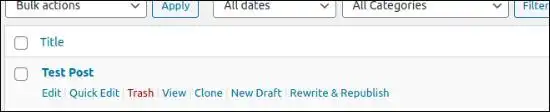
启用插件后,在文章、页面及产品列表下会出现“复制(Clone)”与“新草稿(New Draft)”两个选项,任选其一即可快速复制内容,操作十分简便。
方法二:直接使用代码
如果你倾向于不使用插件,也可以将以下代码添加到当前WordPress主题的functions.php文件中。保存后,文章、页面及产品列表下会出现一个“duplicate”按钮,点击即可迅速复制。
/*www.zsxxfx.com/28731.html,如果代码查看不完整,请浏览这个地址 * Function creates post duplicate as a draft and redirects then to the edit post screen */function rd_duplicate_post_as_draft(){ global $wpdb; if (! ( isset( $_GET['post']) || isset( $_POST['post']) || ( isset($_REQUEST['action']) && 'rd_duplicate_post_as_draft' == $_REQUEST['action'] ) ) ) { wp_die('No post to duplicate has been supplied!'); } /* * Nonce verification */ if ( !isset( $_GET['duplicate_nonce'] ) || !wp_verify_nonce( $_GET['duplicate_nonce'], basename( __FILE__ ) ) ) return; /* * get the original post id */ $post_id = (isset($_GET['post']) ? absint( $_GET['post'] ) : absint( $_POST['post'] ) ); /* * and all the original post data then */ $post = get_post( $post_id ); /* * if you don't want current user to be the new post author, * then change next couple of lines to this: $new_post_author = $post->post_author; */ $current_user = wp_get_current_user(); $new_post_author = $current_user->ID; /* * if post data exists, create the post duplicate */ if (isset( $post ) && $post != null) { /* * new post data array */ $args = array( 'comment_status' => $post->comment_status, 'ping_status' => $post->ping_status, 'post_author' => $new_post_author, 'post_content' => $post->post_content, 'post_excerpt' => $post->post_excerpt, 'post_name' => $post->post_name, 'post_parent' => $post->post_parent, 'post_password' => $post->post_password, 'post_status' => 'draft', 'post_title' => $post->post_title, 'post_type' => $post->post_type, 'to_ping' => $post->to_ping, 'menu_order' => $post->menu_order ); /* * insert the post by wp_insert_post() function */ $new_post_id = wp_insert_post( $args ); /* * get all current post terms ad set them to the new post draft */ $taxonomies = get_object_taxonomies($post->post_type); // returns array of taxonomy names for post type, ex array("category", "post_tag"); foreach ($taxonomies as $taxonomy) { $post_terms = wp_get_object_terms($post_id, $taxonomy, array('fields' => 'slugs')); wp_set_object_terms($new_post_id, $post_terms, $taxonomy, false); } /* * duplicate all post meta just in two SQL queries */ $post_meta_infos = $wpdb->get_results("SELECT meta_key, meta_value FROM $wpdb->postmeta WHERE post_id=$post_id"); if (count($post_meta_infos)!=0) { $sql_query = "INSERT INTO $wpdb->postmeta (post_id, meta_key, meta_value) "; foreach ($post_meta_infos as $meta_info) { $meta_key = $meta_info->meta_key; if( $meta_key == '_wp_old_slug' ) continue; $meta_value = addslashes($meta_info->meta_value); $sql_query_sel[]= "SELECT $new_post_id, '$meta_key', '$meta_value'"; } $sql_query.= implode(" UNION ALL ", $sql_query_sel); $wpdb->query($sql_query); } /* * finally, redirect to the edit post screen for the new draft */ wp_redirect( admin_url( 'post.php?action=edit&post=' . $new_post_id ) ); exit; } else { wp_die('Post creation failed, could not find original post: ' . $post_id); }}add_action( 'admin_action_rd_duplicate_post_as_draft', 'rd_duplicate_post_as_draft' ); /* * Add the duplicate link to action list for post_row_actions */function rd_duplicate_post_link( $actions, $post ) { if (current_user_can('edit_posts')) { $actions['duplicate'] = 'ID, basename(__FILE__), 'duplicate_nonce' ) . '" title="Duplicate this item" rel="permalink">Duplicate'; } return $actions;}add_filter( 'post_row_actions', 'rd_duplicate_post_link', 10, 2 );如果你的WordPress站点已经安装了Code Snippets插件,同样可以将上述代码添加到该插件中,效果也是一样的。
作者:悦然wordpress建站
声明:
文章来自网络收集后经过ai改写发布,如不小心侵犯了您的权益,请联系本站删除,给您带来困扰,深表歉意!
参考文章:wordpress插件必备-你绝不能错过的wordpress插件推荐
本文标题:轻松复制:WordPress文章与页面的快速复刻秘籍!
网址:https://www.wpjiguang.cn/archives/48602.html
本站所有文章由wordpress极光ai post插件通过chatgpt写作修改后发布,并不代表本站的观点;如果无意间侵犯了你的权益,请联系我们进行删除处理。
如需转载,请务必注明文章来源和链接,谢谢您的支持与鼓励!

这个复制方法太实用了,尤其是做电商的时候,省了很多麻烦。
复制内容这么简单,真是我没想到的。有没有人试过其他插件,有什么推荐吗?
Yoast的插件真的不错,设置简单,效果立竿见影!
复制功能太实用了,尤其是对新手来说,能避免很多错误。
对于不喜欢用插件的人,代码复制的方法值得一试,操作简单。
我试过直接修改代码,确实实现了快速复制,省时省力!
我曾经因为重复填写参数而烦恼,看到这个方法真是大快人心,感谢分享!
这个复制功能简直太方便了,省下了好多时间!
我试过这个方法,确实节省了很多时间,特别是产品多的时候。